 Blattwerk
Technical drawing
Create a technical drawing from a STEP file – free, online
You have a part as a STEP file and need a manufacturing drawing? Blattwerk makes it in your browser: the views appear by themselves, you add dimensions with one click, and you save it as a PDF. Free, no install, no account.
Try it with a sample part or download for Windows
The app in the browser is in English (or German – you can switch at the top right). The Windows version is currently in German only.
Four steps to a drawing
- Open the model. Drop a STEP file (.step, .stp) on the page. IGES, BREP, STL, OBJ, 3MF and PLY work too, as well as PDF, DXF and SVG drawings.
- Check the views. Front, top and side view (first-angle projection, ISO 5456) and an isometric view appear at once, with hidden lines and centre lines. Sheet size and scale are chosen for you.
- Dimension. Click an edge and place the dimension. Circles give diameters, arcs give radii. Type tolerances directly, for example “80 ±0.1” or “25 H7”. Auto dimensioning adds overall sizes, holes, hole circles and the steps of turned parts.
- Title block and save. Fill in the title block (ISO 7200) and save as PDF, DXF, SVG or PNG – or print.
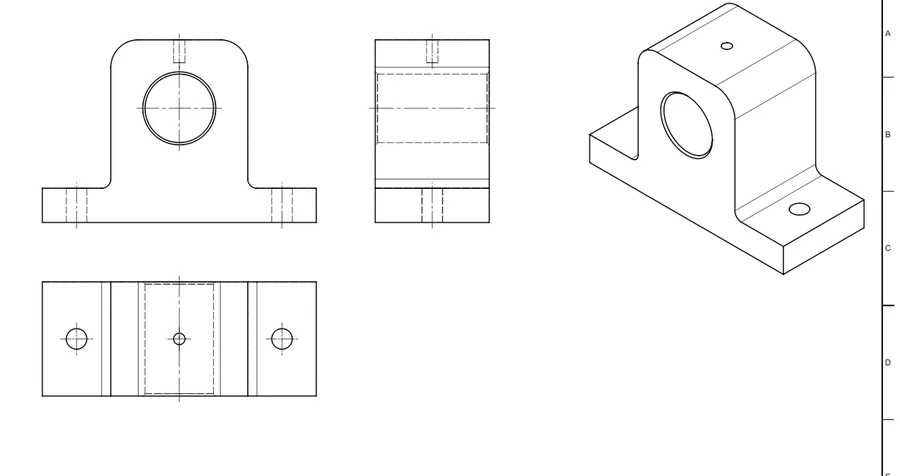
What you can put on the drawing
- Linear, diameter, radius, angle, chain, baseline and ordinate dimensions, chamfers and threads.
- Tolerances and fits (ISO 286), geometric tolerances / GD&T (ISO 1101), datums, surface texture (ISO 1302), welding symbols (ISO 2553), edge symbols (ISO 13715).
- Sections (full, half, stepped, aligned at 45°), detail views, break-outs, auxiliary and exploded views.
- Balloons, parts lists, tables, several sheets, formats A4 to A0.
- A drawing check that finds missing or duplicate dimensions and fixes many issues with one click.
Your file stays with you
Blattwerk computes the model in your browser on your own computer. The STEP file is not uploaded, there is no account and there are no cookies.
Browser or Windows?
Both are free. The browser version needs no installation. The Windows version is a program on your computer; it also reads DWG and has the more precise automatic dimensioning.